
- Home
- About
- Services
- Resources
- Sustainability
- AutoCAD MEP Blog
- Revit MEP Blog
- NavisWorks Blog
- Log In
- Contact
Tags
analysis
AutoCAD MEP
bim
Calculations
Content
Convert
engineering
gbXML
Install
NavisWorks
New
Performance
Revit
Revit MEP
schedules
Service Pack
Sharing
subscription
sustainabilty
Tips
USGBC
Views
Wan Accelerators
Autodesk Green Building Studio analysis tools now available
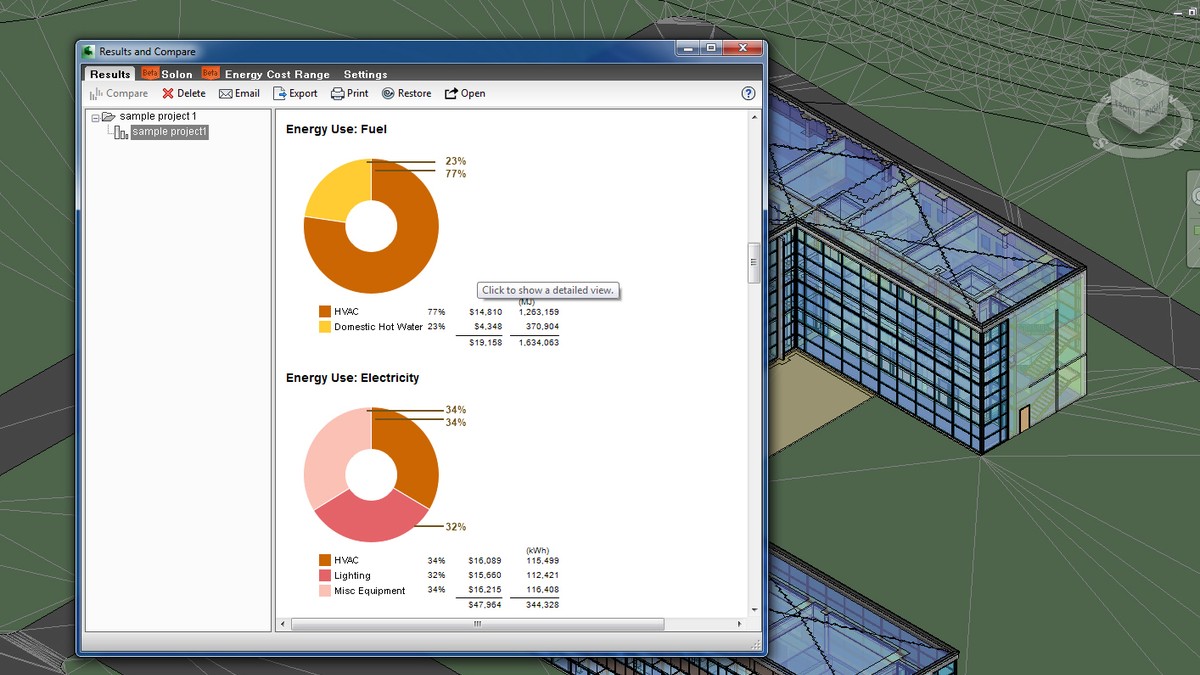
The Autodesk Green Building Studio analysis tools, now available at http://www.autodesk.com/greenbuildingstudio, provide improved design insight through whole building energy, water and carbon-emission analysis, helping architects and designers to maximize building economic and environmental performance. The tools are compatible with Autodesk design software as well as software from other industry providers through the Green Building XML (gbXML) schema and can now be directly accessed from within the Revit platform for BIM with a new plug-in now available for download. Green Building Studio Inc. launched the Green Building Studio web service in 2004.The Autodesk® Green Building Studio® web-based energy analysis service can help architects and designers perform whole building analysis, optimize energy efficiency, and work toward carbon neutrality earlier in the design process. With faster, more accurate energy analysis of building design proposals, architects and designers can work with sustainably in mind earlier in the process, plan proactively, and build better. With the Autodesk® Green Building Studio® web-based energy analysis service, architects and designers can evaluate building components for impact on energy consumption as well as improve economic and environmental performance early in the design process. Compatible with Revit MEP The Autodesk Green Building Studio service is an analysis tool that interoperates with Revit® MEP and other compatible energy-analysis software and facilitates team collaboration and information sharing at all stages of design. Evaluate Energy Profiles of Building Designs Green Building Studio tools enable architects and designers to evaluate the energy profiles and carbon footprints of various building designs. Files are shared between engineering software programs and among engineers and architects early in the design cycle, making sustainable design more efficient and cost effective. With Autodesk Green Building Studio tools, you can
- Capture early sustainable design analysis to support the process of reducing or eliminating negative environmental impacts.
- Communicate among the extended building design team using Autodesk design applications and other compatible energy and green analysis software.
- Gain a competitive advantage with increased client satisfaction and improved environmental performance.
Autodesk Green Build Studios Q&A (pdf – 52Kb) Autodesk’s acquisition of Green Building Studio’s assets was completed on May 1, 2008. They’ve completed the migration of the web service to Autodesk’s hardware. New users and existing Green Building Studio customers can now access the web service in the following manner.
- Current ‘pay-as-you-go’ customers can take advantage of a limited free trial period scheduled to conclude on or about June 30, 2008. Log into your existing account, accept the new Terms of Use agreement, and start realizing carbon neutral design with free analysis on up to two building projects per account.
- New customers can take advantage of a free 30-day trial period. Create a new user account, accept the Terms of Use agreement, and start realizing carbon neutral design with free analysis on up to two building projects per account.
- Returning annual subscription corporate customers can continue to use the Autodesk Green Building Studio web service as usual for the remaining term of your original subscription purchase. Just login to your existing account and accept the new Terms of Use agreement.
- To purchase single user annual subscriptions ($745) and 10-user corporate annual subscriptions ($4,995), login to the Autodesk Green Building Studio web service, accept the new Terms of Use agreement, and select the Upgrade link on the Project List page. Please note, PayPal TM payment services are no longer available. A note to Graphisoft users, the ArchiCAD add-on is temporarily unavailable while we are making updates to our new servers. We do expect availability soon and apologize for the inconvenience.
Users of Autodesk’s Revit®-based software applications who register for the Autodesk Green Building Studio service can now access the service directly with a plug-in available from our Downloads page after login. If you have questions about a new or existing account, please contact their technical support staff directly via email. Technical support can be reached at [email protected].
- Add new comment
- Feed: Revit MEP
- Original article
- bim
- engineering
- gbXML
- Green
- Revit MEP
- sustainabilty
Revit MEP
-
Greenheck Fan offers Revit MEP Families
-
AutoCAD Revit MEP 2010 API to Estimating and CAM
-
REVIT® MEP 2010 Update 1 build (20090612_2115):
-
Andekan Revit Plumbing Pack now available – over 700 objects
-
STL Exporter for Revit now supports 2010 Family
more
AutoCAD MEP
-
Autodesk’s AutoCAD MEP 2010 Product Launch Press Release
-
Fabrication for AutoCAD MEP 2008 with EastCoast CAM
-
Autodesk to Acquire BIMWorld
-
Assigning IFC Classifications To AutoCAD MEP Objects
-
Content Extension for AutoCAD MEP 2009
more
NavisWorks
-
Navisworks – Wireframe Proxies During DWG Import
Search
Engineering BIM Solutions’s Facebook Page | 
Recent comments
-
Хорошо однако!, спасибо!10/09/2010 – 04:19
-
Уважаемый автор, прошу10/04/2010 – 05:11
-
Баба прядет – не по две10/04/2010 – 05:01